|
 |
 |
       | ||
| ||||||
 |
|
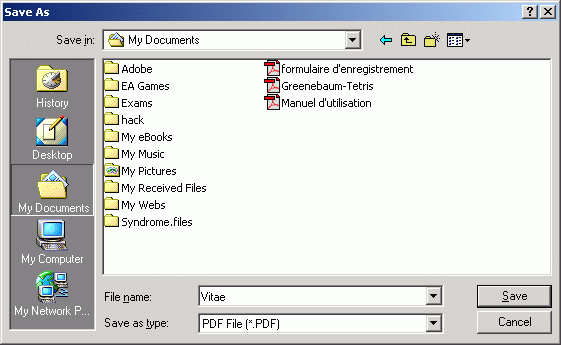
How to convert PS to PDF 1. Open a PS Viewer / Browser (Here, we take GSView as an example) 2. Open a PS (Post Script) document 3. Select from main menu "File"->"Print" 4. Select Printer "Virtual PDF Printer" 5. If you need to adjust PDF generation options, click the "Property" button on the right 6. Click "OK" 7. A dialog will pop up, assign the folder and file name of the PDF document to be generated
8. Congratulations! You have converted PS to PDF document now. NOTE: The above instructions also apply when you are to convert Postscript to PDF on Microsoft Windows 11, Windows 10, Windows 8.1, Windows 8, Windows 7, Windows Server 2022, Windows Server 2019, Windows Server 2016, Windows Server 2012, Windows Server 2008, and Windows Server 2003. Postscript language level 2 and level 3 are supported. All our software is virus-free and Trojan-free, all download links are from reliable sources as claimed.
(C) 2000-2026 Wondersoft All rights
reserved. |
|
 |